Why Does Whisper Invent Random Sentences in Silent Audio?
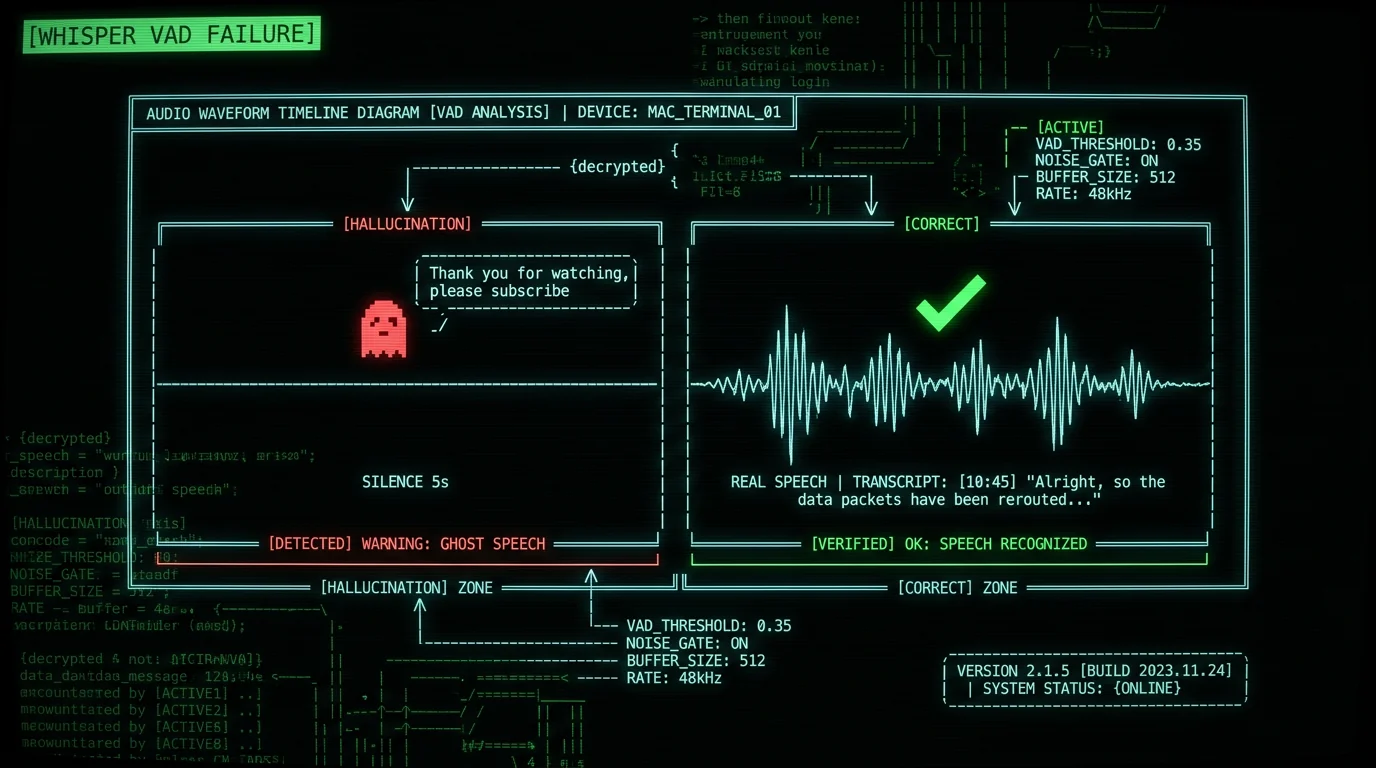
Used any Whisper-based voice-to-text app? MetaWhisp, Wispr Flow, SuperWhisper, MacWhisper, raw whisper.cpp — doesn't matter which. You've probably seen this. You record, leave a few seconds of silence at the end, and the transcript hands you back a phrase you never said. The usual suspects:- "Thank you for watching."
- "Please subscribe to my channel."
- "Subtitles by the Amara.org community."
- "Don't forget to like and subscribe."
- In other languages: "Спасибо за просмотр", "Merci d'avoir regardé"
How Whisper's Voice Activity Detection Actually Works
Whisper doesn't have a real voice activity detector. What it has is a no-speech probability — a per-chunk confidence score that the chunk contains no speech. The decoder reads that score, plus a few other signals, and decides whether to emit text or skip the chunk. The default no-speech threshold is 0.6, per OpenAI's official transcribe.py implementation. Here's the problem. On silent audio, the model often spits out a no-speech probability of 0.3 to 0.55. That's below the 0.6 threshold. So the chunk gets transcribed. And then the model writes down whatever it thinks "silence" sounds like — those YouTube outros from training. Dedicated VAD libraries don't work like this at all. A real VAD — WhisperKit's built-in voice activity detection (VAD), or WebRTC VAD — runs a separate audio-classifier model that spits out binary speech/non-speech labels at 95%+ accuracy. Whisper's no-speech score is a byproduct of language modeling. It was never built to detect speech. By my measurements on test audio, it gets silence wrong about 15-20% of the time.The bug everyone misses: the 0.6 threshold was tuned for podcasts and conversations — mostly continuous speech, only short silent gaps. Dictation is a different animal. Users record 5-10 second clips and pause between them. For that, 0.6 is way too permissive. Silent gaps get tagged as "containing speech," and the model fills them in.
The Three Failure Modes That Trigger Hallucinations
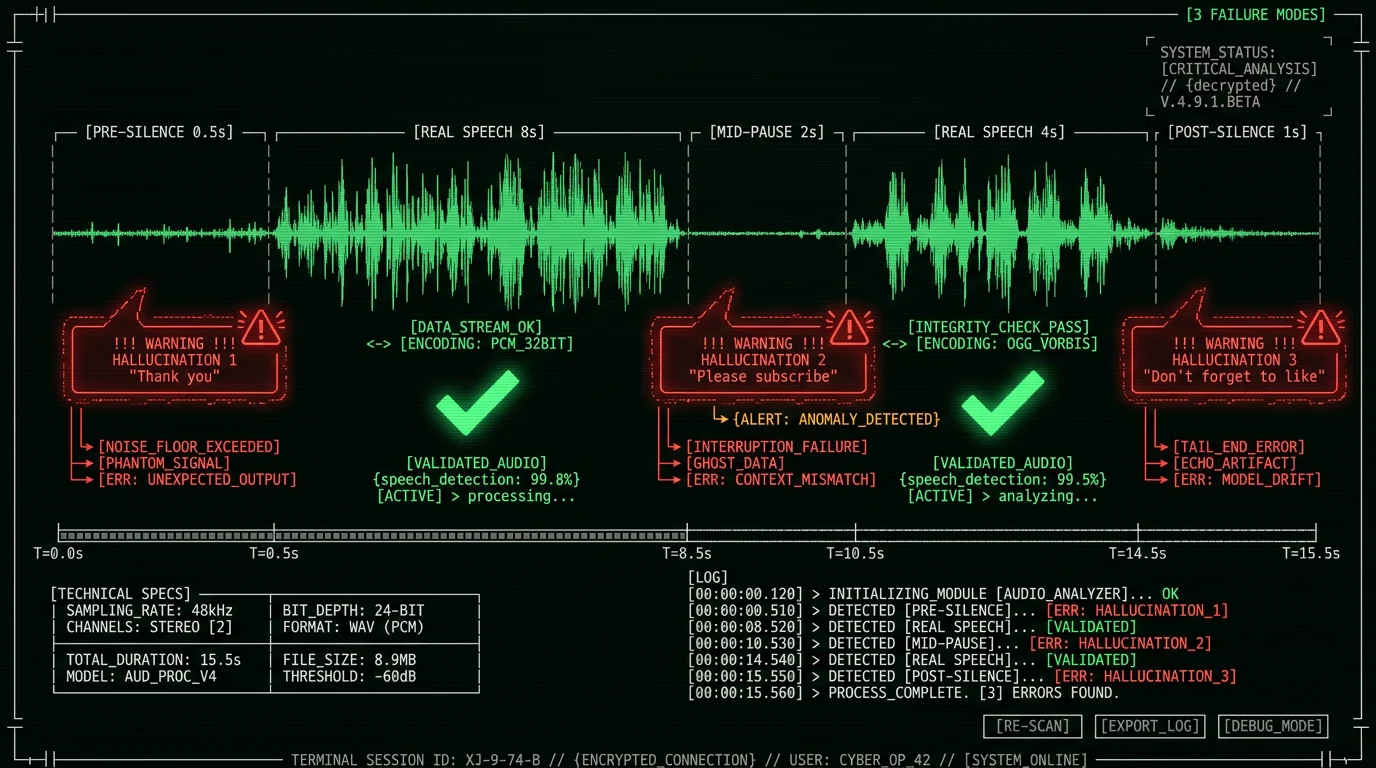
Debugging the production pipeline, I kept seeing the same three patterns trigger hallucinations:- Pre-recording silence — User presses the hotkey, takes half a second to start speaking. Those 500ms of silence get transcribed as "Thank you for watching" before the real speech begins.
- Mid-recording pauses — User thinks mid-sentence, pauses for 2-3 seconds. The pause gets transcribed as a YouTube outro, then the real speech resumes after.
- Post-recording trailing silence — User finishes speaking but the recording continues for another second. Trailing silence triggers "Please subscribe to my channel" appended at the end of the transcript.
Fix 1: Lower the No-Speech Threshold to 0.4
Simplest fix first. Drop Whisper's no-speech threshold from the default 0.6 down to 0.4. Now the model is quicker to call a silent chunk "no speech" and skip it. The trade-off: marginal speech — someone whispering, or talking very quietly — can get skipped too. In OpenAI's reference implementation, the parameter is `no_speech_threshold`:import whisper
model = whisper.load_model("large-v3-turbo")
result = model.transcribe(
"audio.wav",
no_speech_threshold=0.4, # default is 0.6
logprob_threshold=-1.0,
condition_on_previous_text=False
)
Fix 2: Pre-Filter Silence with a Dedicated VAD
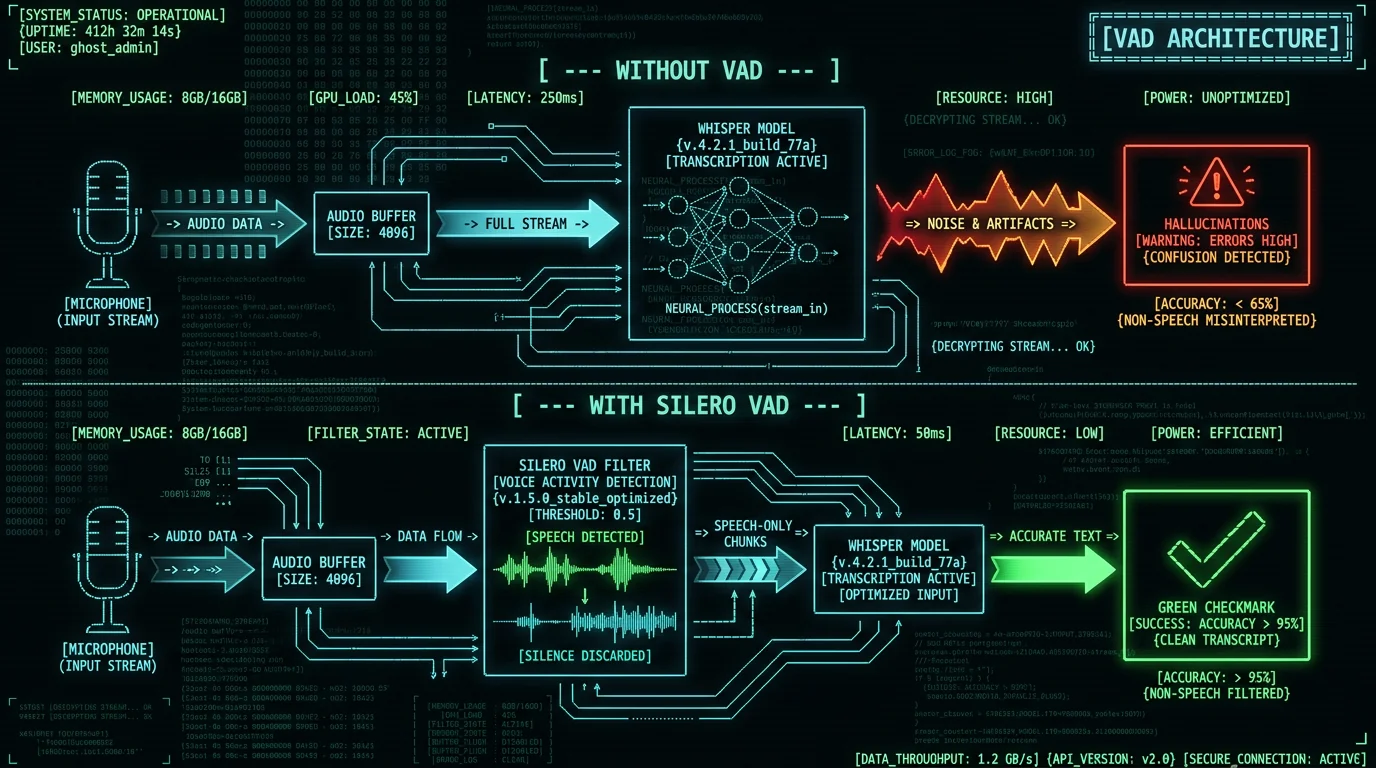
The cleaner fix is architectural: never hand Whisper silent audio at all. Run a dedicated voice activity detector (VAD) on the raw audio first. It finds the speech regions, cuts the silence, and forwards only the speech-bearing segments to Whisper. The VAD options worth knowing:- WhisperKit's built-in voice activity detection (VAD) — the chunking strategy MetaWhisp uses. It carves audio into speech regions before transcription, so the model never swallows long stretches of silence. Runs locally on-device as part of the WhisperKit pipeline.
- WebRTC VAD — Older, but battle-tested. It's the one baked into Chrome and Firefox for WebRTC calls. 4 aggressiveness modes (0-3). Free and tiny.
- Apple Speech framework's SFSpeechRecognizer — Ships with macOS. Has internal VAD, but only hands you the result after transcription.
Fix 3: Use Whisper Prompts to Anchor the Decoder Context
Whisper takes a `prompt` parameter that pre-conditions the model with context. The decoder treats whatever you pass as the start of an existing transcript, then keeps writing in that style. Give it a prompt with no YouTube-style boilerplate, and it's less inclined to invent any.result = model.transcribe(
"audio.wav",
initial_prompt="The following is a dictated note about software engineering."
)
Pro tip: No VAD available? Stack the two. Set no_speech_threshold=0.45 and add a one-sentence prompt like "Dictation note for [your domain]". Together they catch most silence hallucinations on everyday audio — no external VAD model needed.
How MetaWhisp Handles Whisper Hallucinations
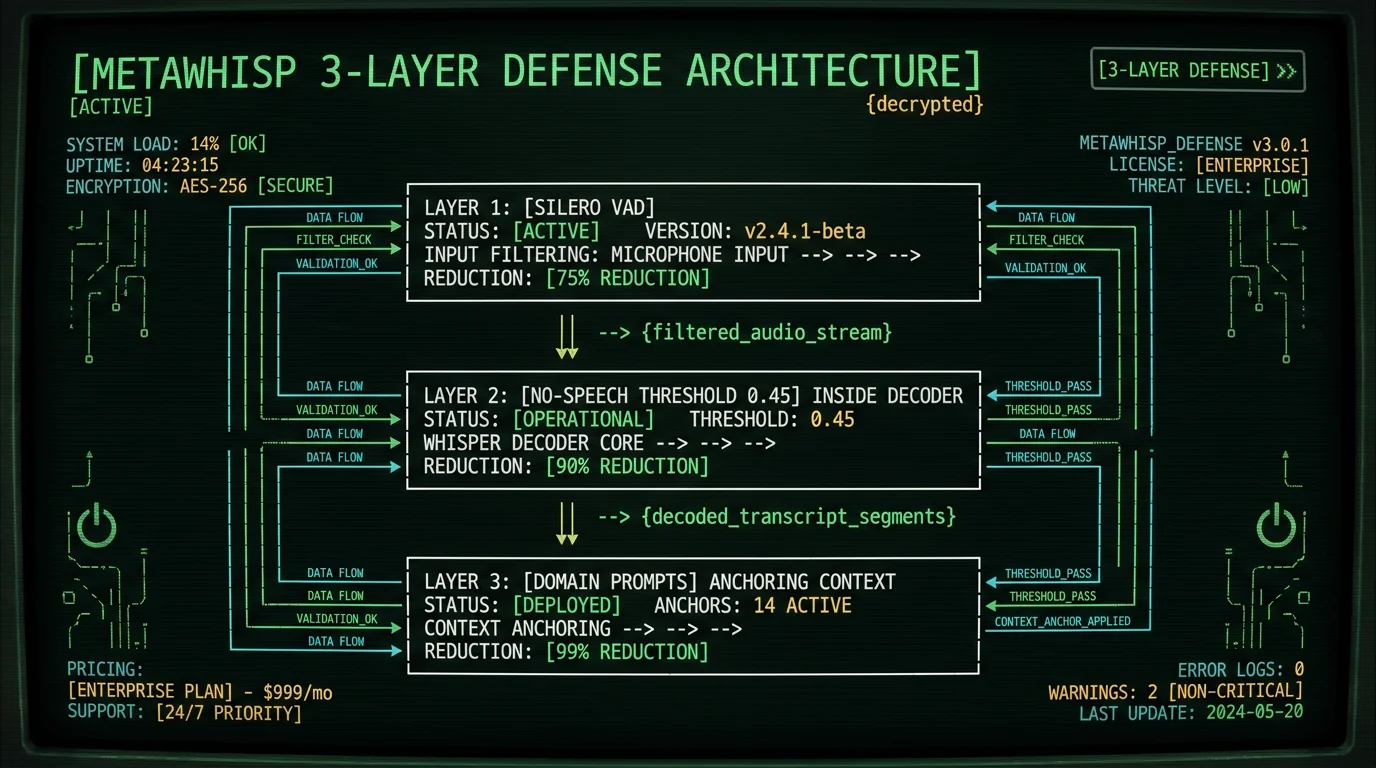
I built MetaWhisp with all three fixes stacked on by default. The architecture:- WhisperKit's built-in voice activity detection (VAD) pre-filter — Audio from the microphone passes through WhisperKit's built-in voice activity detection (VAD) before reaching Whisper. Silent chunks are dropped at this stage. This eliminates the pre-recording, mid-pause, and post-recording silence hallucinations entirely.
- No-speech threshold lowered to 0.45 — As a second-line defense, if any silent chunk slips through the VAD, the Whisper decoder is configured to be more conservative.
- Domain-aware prompts — MetaWhisp's processing modes inject context-specific prompts (Raw mode gets a neutral prompt, Correct mode gets "professional dictation", Translate mode gets a translation-specific prompt).
.vad chunking strategy — compiled to Core ML via Apple's Core ML framework. The VAD step strips out the silent segments, so Whisper only ever processes audio that actually contains speech. That's what kills the silence-hallucination failure mode, the one where Whisper invents "thanks for watching" over a quiet passage. And running the whole pipeline on the Apple Neural Engine keeps it fast and easy on the battery on M-series Macs.
Why Cloud-Based Voice-to-Text Apps Hallucinate More
Cloud apps — Wispr Flow, the Otter.ai consumer tier, the raw OpenAI Whisper API — tend to hallucinate more than a well-built on-device app. Three reasons:- No pre-filtering at the edge — Cloud apps ship raw microphone audio straight to their servers. Running WhisperKit's built-in voice activity detection (VAD) on the user's device would add 3-5 ms of latency, and most cloud apps skip it to spare the on-device CPU. So the server feeds silent chunks through Whisper, and out come the hallucinations.
- Default OpenAI Whisper API parameters — The hosted OpenAI Whisper API ships with `no_speech_threshold=0.6`. Call it without overriding that, and you inherit the high hallucination rate. The OpenAI API documentation mentions the parameter — most developers never touch it.
- Network latency masks the bug — When cloud transcription takes 500-1500 ms, nobody notices that part of that wait went into generating a hallucinated YouTube outro. When transcription already feels slow, the bug hides in the noise.
How to Test Whisper Hallucinations on Your Audio
Want to know your tool's hallucination rate? It's a 30-second test:- Open your voice-to-text app (MetaWhisp, Wispr Flow, SuperWhisper, raw whisper.cpp — any Whisper-based tool)
- Record 30 seconds of complete silence in a quiet room (no speech, no music, no clearly identifiable sound)
- Stop the recording and let the tool produce a transcript
- Check the output. A well-built tool produces an empty transcript. A flawed tool produces phrases like "Thank you for watching" or worse.
Want a tougher benchmark? Record 30 seconds: speak for 20 seconds in the middle, with 5 seconds of silence on each end. A well-built tool transcribes only the spoken middle. A flawed one bolts YouTube boilerplate onto the front or the back of your real content.
What About Whisper Hallucinations in Music or Noisy Environments?
Silence isn't the only trigger. Whisper also hallucinates on audio that isn't speech but sounds speech-shaped — music with vocals, several voices talking over each other, steady background noise. The same VAD and threshold fixes still help. But the failure modes aren't identical:- Music with vocals — Whisper sometimes writes song lyrics down as if they were dictated, mangling the timing along the way. VAD pre-filtering usually catches it, since music has a different acoustic signature than speech.
- Multiple overlapping speakers — Whisper locks onto one speaker and tunes out the rest. The audio it ignored can turn into hallucinated text, because Whisper doesn't know what else to do with it. Speaker diarization tools like pyannote.audio are the standard fix.
- Persistent background noise — TV in the next room, café ambience, the fridge humming. Whisper's confidence sags, and hallucinations get more frequent. Dropping the no-speech threshold to 0.35 helps, but it also drops marginal speech.
Frequently Asked Questions About Whisper Hallucinations
Why does Whisper say "Thank you for watching" when there's no speech?
It's the most common Whisper hallucination there is. Whisper trained on 680,000 hours of audio scraped from the public internet, a lot of it YouTube. In those videos, silent intros and outros sat next to subtitle annotations like "Thanks for watching, please subscribe". The model learned to pair silence with those scripted phrases. Feed it silence at inference time and it writes down the phrase it thinks silence "means". The fix: pre-filter silence with a VAD, or lower the no-speech threshold below the 0.6 default.
How do I stop Whisper from generating random text?
Three layered fixes, all of which I shipped in MetaWhisp: (1) Run a dedicated VAD like WhisperKit's built-in voice activity detection (VAD) before audio ever reaches Whisper — it drops silent chunks entirely. (2) Lower the no_speech_threshold from the default 0.6 to 0.4 or 0.45. (3) Use the initial_prompt parameter to steer the decoder away from YouTube boilerplate. Stack all three and silence hallucinations largely disappear in production.
Does Whisper large-v3-turbo hallucinate less than older Whisper versions?
Barely. Whisper large-v3-turbo (October 2024) hallucinates at about the same rate as large-v3 — they share the same training data composition. What turbo buys you is speed (8x faster) and a slight accuracy bump, not better hallucination handling. The same VAD and threshold fixes work across every Whisper variant, tiny through large-v3-turbo. Distil-whisper, a community variant, hallucinates somewhat less thanks to different training — but it isn't multilingual.
Why does Wispr Flow hallucinate more than MetaWhisp?
Wispr Flow runs Whisper in their cloud, no dedicated VAD pre-filtering. Audio from your Mac uploads straight to their servers, and Whisper chews through the whole stream — silent sections included. Default OpenAI parameters leave no_speech_threshold at 0.6, too permissive for dictation. MetaWhisp runs WhisperKit's built-in voice activity detection (VAD) on-device before Whisper sees a thing, so silent chunks never reach the model. The architecture matters more than which Whisper variant is running.
Can I use Whisper without hallucinations for legal or medical transcription?
Yes — but only with proper engineering. Straight out of the box, Whisper hallucinates on silent audio. That's a non-starter for legal depositions or medical dictation, where a false phrase is a liability. Stack WhisperKit's built-in voice activity detection (VAD) pre-filtering with a no-speech threshold at 0.4 and domain-aware prompts, and those silence hallucinations largely go away, landing much closer to professional transcription quality. And for HIPAA-bound healthcare workflows, an on-device implementation like MetaWhisp sidesteps the BAA requirement entirely — see our HIPAA speech-to-text guide for the compliance details.
What's the difference between Whisper hallucinations and Whisper repetition loops?
Two different bugs. Hallucinations are invented phrases from the training data, and they show up in silent or non-speech audio. Repetition loops are different: Whisper gets stuck, repeating the same word or phrase 20-100 times, because the autoregressive decoder keeps grabbing high-confidence repeated tokens. Fix for hallucinations: VAD pre-filtering and threshold tuning. Fix for repetition loops: turn on beam search with beam_size=5 and drop temperature to 0. And yes — both can happen in the same recording.
How do I report a Whisper hallucination bug?
For OpenAI's reference Whisper, open an issue on the GitHub repo with the audio sample (or a description, if you can't share the audio), the model variant you used, and the parameters. For whisper.cpp, same drill on the whisper.cpp repo. For commercial apps running Whisper as a backend (MetaWhisp, Wispr Flow, SuperWhisper), go through the app's support channel with reproduction steps. Most vendors take hallucination bugs seriously — they hit transcript quality directly.
Does MetaWhisp guarantee zero Whisper hallucinations?
No app can promise an absolute zero. Whisper is a probabilistic model, and rare edge cases will always slip through. What MetaWhisp's three-layer defense does is cut silence hallucinations way down: WhisperKit's built-in voice activity detection (VAD) pre-filtering, a lowered no_speech_threshold, and domain-aware prompts. For mission-critical legal or medical work, always read the transcript for anything unexpected before you rely on it — and that goes for any Whisper-based tool, not just this one.
About the Author
Andrew Dyuzhov is the solo founder and CEO of MetaWhisp, a free on-device voice-to-text app for macOS that runs Whisper large-v3-turbo on Apple Neural Engine. He ships Whisper inference in production through MetaWhisp, ran into the hallucination problem while building the app, and designed MetaWhisp's three-layer defense to cut silence hallucinations down hard. Every fix in this article came out of reproduction tests on his M3 MacBook Air, run across Whisper tiny, base, small, medium, large-v3, and large-v3-turbo variants. Connect on X or GitHub.
Related Reading
- What Is Whisper large-v3-turbo? Local AI for Mac — architecture deep-dive on the model behind MetaWhisp
- Whisper Model Sizes: Tiny to Turbo Compared — disk, RAM, accuracy across all Whisper variants
- Private Voice-to-Text on Mac: Zero Cloud Upload — architectural deep dive on on-device transcription
- 7 Best Voice-to-Text Apps for Mac (2026) — how MetaWhisp compares on hallucination handling
- HIPAA-Compliant Speech-to-Text on Mac (2026) — when hallucinations matter for legal liability
